
Attach the microinverter to the PV racking
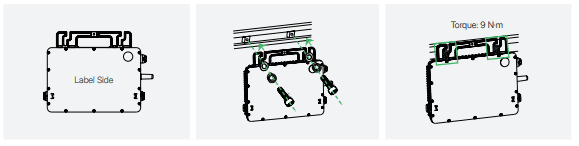
Step 1 - Installation Diagram
A) Plan and mark the position of the microinverter on the PV racking.
B) Place the microinverter (label side up) onto the racking.
C) Secure the microinverter to the racking (torque: 9 N·m).
Label Side / Torque: 9 N·m
WARNING
- • Leave as much space between the microinverter and any nearby surface as you can for reliable communication.
- • Allow at least 2 cm of space around the microinverter for ventilation and heat dissipation.
- • The AC cables already include earth wires for direct grounding. If external grounding is required at your installation site, you can order the grounding accessory by emailing sales@hoymiles.com.
Torque: 2 N·m
Connect the AC Trunk Connector
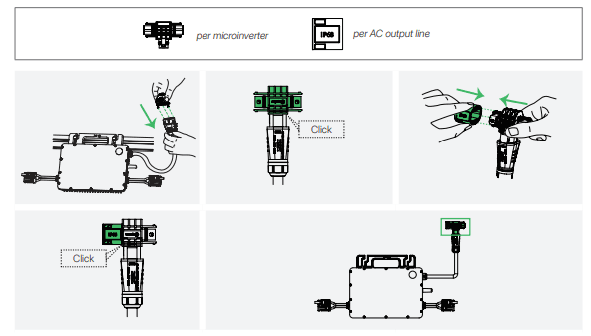
Step 2 - Installation Diagram
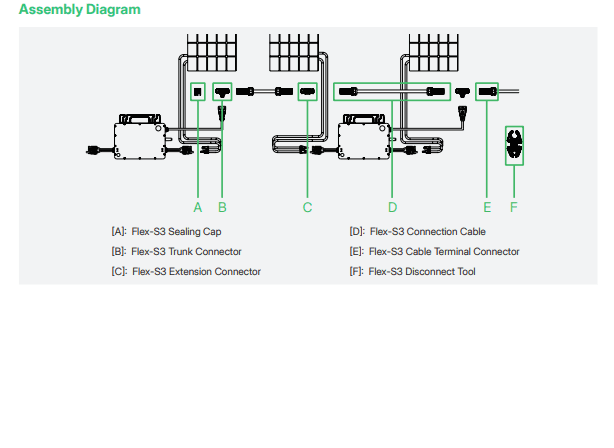
A) Connect the Flex-S3 Trunk Connector to the microinverter.
B) Cover the unused port on the Flex-S3 Trunk Connector (located at the beginning of the AC Trunk) with a Flex-S3 Sealing Cap.
Listen for a click as the sealing cap engages.
✓ 1 per microinverter per AC output line
Click
Connect adjacent microinverters
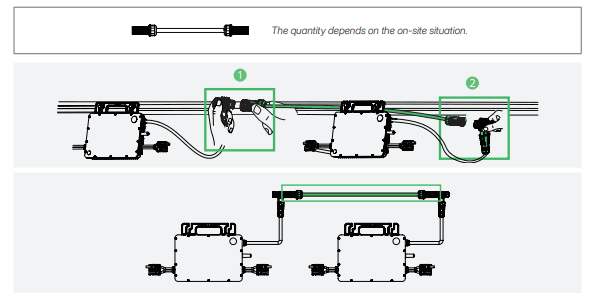
Step 3 - Installation Diagram
Use the Flex-S3 Connection Cables to connect all microinverters one by one. Listen for a click as they engage.
✓ The quantity depends on the on-site situation.
Obstacle Scenario
If you need to space microinverters farther apart, Hoymiles offers two solutions:
- • Using a longer Flex-S3 Connection Cable: Hoymiles offers cable lengths including 1.1 m, 2.0 m, 2.3 m, 3.0 m, and 4.6 m. If you require a different length, contact our sales team by emailing sales@hoymiles.com.
- • Using a Flex-S3 Extension Connector to connect two Flex-S3 Connection Cables into a longer one.
* To disconnect the Flex-S3 Extension Connector from the AC Trunk, you must use a Flex-S3 Disconnect Tool.
Make the AC End Cable
A) Separate the Flex-S3 Cable Terminal Connector into six parts, then slide the nut, compression ring, and gasket over the AC cable in the correct order.
Order: 1) Nut → 2) Compression Ring → 3) Gasket
.png&w=1920&q=75)
NOTICE
Two terminal pin sizes are available: one for 2.5 mm² cables and the other for 4 mm² or 6 mm² cables. Choose the correct terminal pin size matching the cable size to ensure a reliable and secure connection. Using the wrong size may result in potential issues or connection failures.
B) Strip off 40 ± 5 mm of the outer jacket with a cable cutter. Then use a wire stripper to strip the insulation to expose 6 mm to 7 mm of the conductors.
a = 40 ± 5 mm
b = 6 to 7 mm
NOTE: Take care not to cut individual conductor strands.
.png&w=1920&q=75)
C) Secure the conductors to the terminal pins.
• Stranded Wire
Insert the conductors into the terminal pins, and crimp them securely using a crimping tool.
.1.webp&w=1920&q=75)
• Solid Wire
Insert the conductors into the terminal pins, and tighten the screws clockwise using the hex key provided (torque: 0.3 to 0.4 N·m).

Torque: 0.3 to 0.4 N·m
D) Insert the crimped cable into the connector body.
N: Blue
PE: Green & Yellow
L: Brown
NOTICE: Wiring color codes may vary. Always adhere to national and site-specific regulations for wiring.
.webp&w=1920&q=75)
E) Insert the connector body into the cover.
Click
.webp&w=1920&q=75)
F) Slide the gasket, compression ring, and nut over the cable assembly. Tighten the nut to 2.5 ± 0.5 N·m.
Order: 3) Gasket → 2) Compression Ring → 1) Nut
Torque: 2.5 ± 0.5 N·m
.webp&w=1920&q=75)
Connect the AC End Cable
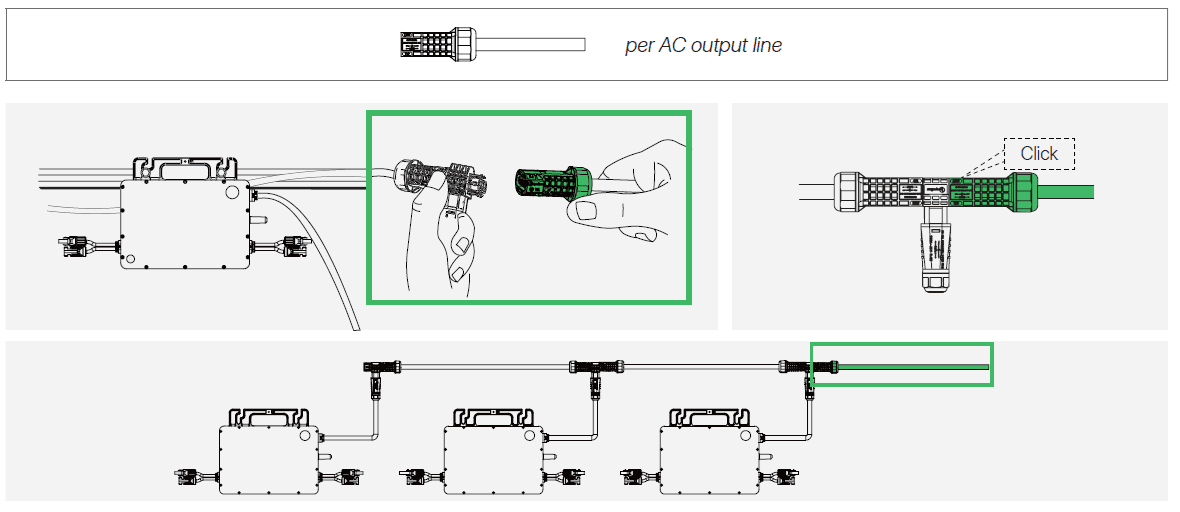
Step 5 - Installation Diagram
Connect the AC End Cable to the last Flex-S3 Trunk Connector in the AC Trunk. Listen for a click as they engage.
✓ 1 per AC output line
Click
Manage the AC Trunk
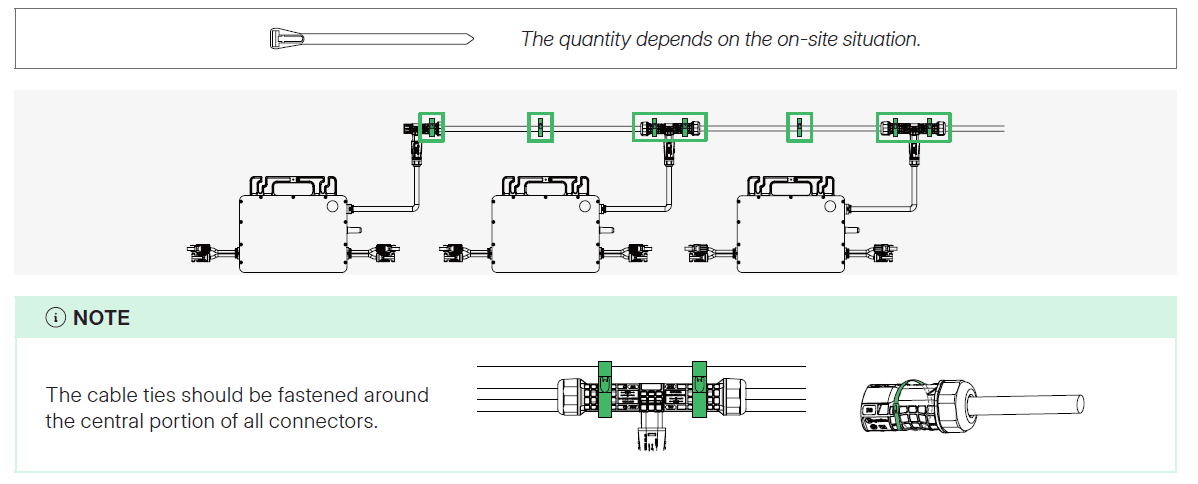
Step 6 - Installation Diagram
Secure all cables and connectors to the racking with metal cable ties, following local wiring regulations for tie spacing.
✓ The quantity depends on the on-site situation.
NOTE: The cable ties should be fastened around the central portion of all connectors.
Connect to the distribution box
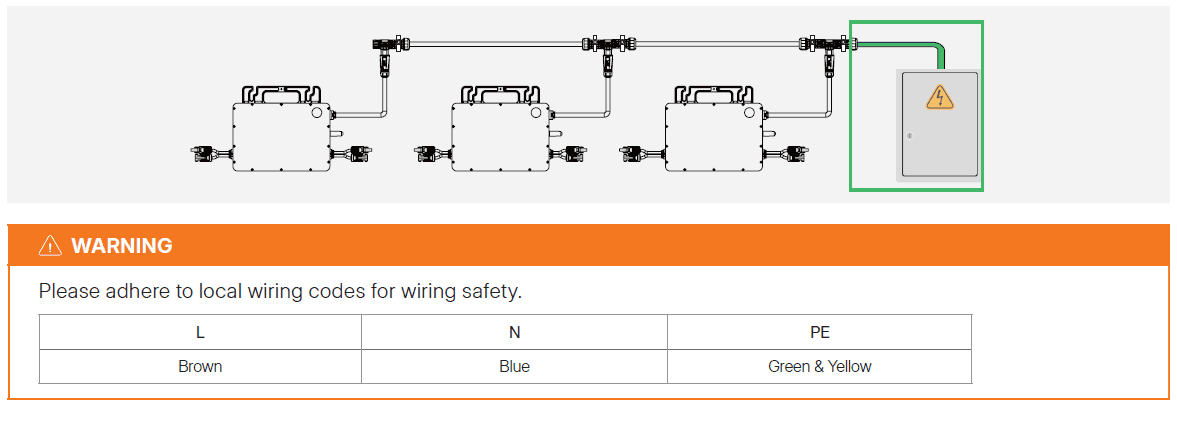
Step 7 - Installation Diagram
Connect the other end of the AC End Cable to the distribution box.
WARNING
Please adhere to local wiring codes for wiring safety.
Wiring:
Complete the installation map

Step 8 - Installation Diagram
A) Peel off the removable SN labels and affix them to respective locations on the installation map. Keep the installation map properly for your records.
B) Record each microinverter's initial AP password for system monitoring.
Initial Password:
S/N: _______________
Password: _______________
Connect the PV Modules

Step 9 - Installation Diagram
A) Connect the female connectors of PV modules to the DC male connectors of the microinverter.
B) Connect the male connectors of PV modules to the DC female connectors of the microinverter.
C) Mount the PV modules above the microinverters.
CAUTION
The microinverter's DC male connector is marked with a "+" sign, while the DC female connector is marked with a "-" sign. These symbols simply indicate the gender of the connector and do not imply the positive or negative current.
Start-up
A) Check the following before powering on the system:
| Check Item | Acceptance Criteria |
|---|---|
| Microinverter | The microinverters are installed correctly and securely. |
| Cables routing | Cables are routed properly as required. |
| Cable ties | Cable ties are evenly distributed and no burr exists. |
| Cable connection | The AC output power cable and DC input power cable are connected correctly, securely, and reliably. |
B) Turn ON the AC disconnect switch or circuit breaker for each AC output line.
C) Turn ON the main utility-grid AC circuit breaker.
D) Allow five minutes for the system to start generating power.
E) Check the LED status.
If the microinverter is operating as expected, the LED indicator will flash green. If the LED indicator remains off or lights solid red, see "LED Indicator Status".